
Software & Apps Reviews: Discover the Best Digital Tools software or an app can look simple until you actually have hundreds of options in front of you.There is an app for almost everything today—writing, communication, design, productivity, business, education, finance, entertainment, project management, and everyday organization. The challenge is not finding a tool. The real challenge is finding one that fits your needs.A good software review should help you answer practical questions: Is the tool easy to use? Does it solve the problem I have? Is the price reasonable? Does it work reliably? Are the useful features locked behind a higher plan?This guide explains how to evaluate software and apps, what to look for in reviews, and how to choose digital tools without wasting money or time.
Why Software & App Reviews Matter

Software can look impressive on a website or app store, but promotional descriptions rarely tell you the whole story.A tool might have dozens of features, yet you may only need three of them.For example, someone looking for a simple note-taking app may not need advanced collaboration, automation, or artificial intelligence features. Paying for a large package could simply add unnecessary complexity.This is where a useful review helps.
A practical software review should look beyond the marketing message and consider:
- Ease of use
- Important features
- Pricing
- Performance
- Compatibility
- Security and privacy information
- Customer support
- Limitations
- Overall suitability for different users
The best software is not necessarily the software with the longest feature list. It is the software that solves your particular problem well.
What Types of Software and Apps Can You Review?
Software reviews cover a huge range of digital products.
| Category | Examples of What to Evaluate |
|---|---|
| Productivity | Tasks, notes, calendars, workflows |
| Writing | Editing, grammar, formatting, AI features |
| Design | Templates, editing tools, creative features |
| Business | CRM, accounting, project management |
| Communication | Messaging, video calls, collaboration |
| Education | Courses, learning tools, study features |
| Security | Password management, privacy, protection |
| Finance | Budgeting, tracking, financial organization |
| Entertainment | Streaming, music, games, media features |
| Marketing | SEO, email marketing, analytics, automation |
| Cloud Storage | Storage space, syncing, file sharing |
| Mobile Apps | Usability, performance, permissions |
The right evaluation criteria depend on the type of product.
A video-editing app, for example, should not be reviewed in exactly the same way as accounting software.
Start With the Problem You Want to Solve
Before comparing software, identify the actual problem.
This sounds obvious, but it is one of the easiest steps to skip.
Instead of asking:
“What is the best productivity app?”
ask:
“What is making my daily work difficult?”
Maybe you need:
- A better way to organize tasks
- A simple calendar
- Easier file sharing
- Faster document creation
- Better communication
- Automated repetitive work
- A way to track business expenses
Once the problem is clear, finding the right software becomes much easier.
Look at the Core Features
Every software product has a collection of features, but not every feature deserves equal attention.
Start with the features that directly solve your main problem.
For example, when reviewing a project management application, you might look at:
- Task management
- Project boards
- Deadlines
- Team collaboration
- File attachments
- Notifications
- Reporting
- Integrations
- Automation
Then ask a simple question:
Do these features actually make my work easier?
A long feature list can look impressive, but practical usefulness matters more.
Software Ease of Use
A powerful tool can still be frustrating if it takes too long to understand.
When reviewing software, consider how quickly a new user can get started.
Look at:
- Signup process
- Navigation
- Dashboard design
- Setup requirements
- Tutorials
- Search functions
- Mobile experience
- Help documentation
For everyday software, simplicity can be a major advantage.
You should not have to spend an entire afternoon searching for a basic setting.
Check Compatibility
Before choosing software, make sure it works with the devices and operating systems you use.
Check whether it supports:
- Windows
- macOS
- Android
- iOS
- Web browsers
- Tablets
- Cloud environments
Also consider whether your software needs to work across multiple devices.
For example, if you start a document on your laptop and want to continue editing it from your phone, synchronization becomes important.
Understand Software Pricing
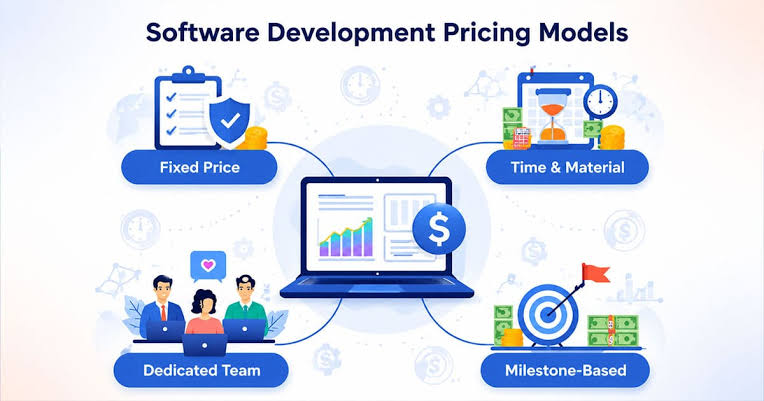
Pricing is one of the most important parts of any software review.
A product may advertise a low starting price, but the plan you actually need could cost considerably more.
Look carefully at:
- Free plans
- Free trials
- Monthly pricing
- Annual pricing
- Per-user fees
- Storage limits
- Feature restrictions
- Usage limits
- Add-on costs
- Renewal pricing
A simple comparison can make pricing easier to understand:
| Pricing Type | Best For | What to Check |
|---|---|---|
| Free | Basic users | Feature and usage limits |
| Monthly | Flexible users | Monthly cost |
| Annual | Long-term users | Total yearly price |
| Per-user | Teams | Cost as the team grows |
| Usage-based | Variable usage | How usage is calculated |
| Enterprise | Larger organizations | Custom pricing and features |
Never judge software only by its cheapest advertised price.
Look at the plan that actually includes the features you need.
Free Software vs Paid Software
Free software can be surprisingly capable.
For many everyday tasks, a free tool may provide everything a person needs.
However, paid software may offer additional benefits such as:
- More storage
- Advanced features
- Better collaboration
- Fewer restrictions
- Priority support
- Automation
- Professional tools
The question is not whether paid software is automatically better.
The better question is:
Does the additional value justify the additional cost for me?
Read Reviews With a Critical Eye
Online reviews can be helpful, but they should not be your only source of information.
One person may love an app because it is simple. Another may dislike it because it lacks advanced features.
Look for patterns across multiple reviews.
Pay attention to repeated comments about:
- Performance
- Bugs
- Customer service
- Difficult setup
- Missing features
- Unexpected charges
- Privacy concerns
- Frequent updates
Repeated feedback is generally more useful than one extremely positive or negative comment.
Privacy and Security Matter
Software often handles personal, professional, or business information.
That makes privacy and security important considerations.
Before choosing an app, check available information about:
- Data collection
- Account security
- Encryption
- Privacy policies
- Permissions
- Two-factor authentication
- Data export
- Account deletion
The level of security you need depends on what information the software handles.
A simple shopping-list app and a business accounting platform do not carry the same level of risk.
Check Integrations
A great software tool should ideally fit into the rest of your digital workflow.
For example, a marketing platform might integrate with:
- Email services
- CRM systems
- Analytics platforms
- Payment tools
- Social media platforms
- Website platforms
Integrations can reduce repetitive work.
Imagine having to manually copy customer information from one system to another every day. A suitable integration could save significant time.
Look at Customer Support
Support becomes especially important when software is used for business or essential tasks.
Check whether the provider offers:
- Help center
- Email support
- Live chat
- Tutorials
- Community forums
- Knowledge base
- Phone support
- Dedicated account support
Not every user needs premium support, but knowing where to get help when something breaks can provide peace of mind.
Mobile Apps vs Desktop Software
Many services now offer both desktop and mobile versions.
But the experience may not always be identical.
A mobile app may be ideal for quick tasks, notifications, or checking information while away from your computer.
Desktop software may be better for complex work that requires a larger screen.
Before choosing a product, think about where and how you actually use it.
AI Features in Modern Software
Artificial intelligence has become a common feature across many software categories.
AI tools can help with:
- Writing
- Summarization
- Research
- Image creation
- Data analysis
- Customer support
- Automation
- Transcription
- Coding
- Productivity
However, an AI feature should not automatically make a product better.
Ask whether the feature is genuinely useful and whether it saves time or improves the result.
Also check how the provider explains data usage, privacy, limitations, and user controls when AI features process your information.
How to Compare Two Software Products
When two tools appear similar, create a simple comparison.
| Factor | Software A | Software B |
|---|---|---|
| Price | Check current plan | Check current plan |
| Ease of use | Evaluate setup | Evaluate setup |
| Key features | Match your needs | Match your needs |
| Integrations | Check availability | Check availability |
| Mobile support | Check platform | Check platform |
| Customer support | Compare options | Compare options |
| Storage/limits | Review plan | Review plan |
| Best suited for | Identify user type | Identify user type |
Instead of asking which product is universally better, ask:
Which one fits my needs, budget, workflow, and technical comfort?
That question usually leads to a more useful decision.
Software for Different Types of Users

Different people need different tools.
For Students
Students may benefit from software for:
- Note-taking
- Research
- Time management
- Writing
- Collaboration
- Online learning
A simple interface can be particularly useful when managing several subjects at once.
For Freelancers
Freelancers often need tools for:
- Invoicing
- Project management
- Communication
- File storage
- Time tracking
- Client management
The goal is usually to keep administrative work manageable so more time can go toward actual client work.
For Small Businesses
Small businesses may look for:
- Accounting software
- CRM tools
- Marketing platforms
- Team collaboration
- Project management
- Customer support
Integration becomes increasingly useful as the number of business tools grows.
For Creators
Creators may need software for:
- Graphic design
- Video editing
- Writing
- Social media planning
- Content organization
- Analytics
The best tool often depends on the creator’s workflow rather than popularity alone.
Common Mistakes When Choosing Software
Choosing Too Many Tools
It is easy to collect software subscriptions.
One app manages tasks, another stores notes, another handles communication, and another tracks projects.
Eventually, you may spend more time managing tools than doing the work.
A smaller, well-connected software stack can sometimes be easier to manage.
Paying for Features You Never Use
A premium plan can look attractive, but unused features are still an expense.
Choose based on your actual requirements.
Ignoring Renewal Prices
Some software offers promotional introductory pricing.
Always check what happens after the promotional period ends.
Not Testing the Product
When a free trial or free version is available, use it before committing to a long-term subscription.
Try the tasks you actually perform rather than simply clicking through the dashboard.
Forgetting Data Portability
Before depending heavily on a platform, consider whether you can export your information if you eventually move to another service.
A Simple Software Buying Checklist
Before choosing a digital tool, ask:
| Question | Why It Matters |
|---|---|
| Does it solve my main problem? | Keeps the purchase focused |
| Is it easy to use? | Reduces frustration |
| Does it work on my devices? | Ensures compatibility |
| Is the pricing clear? | Prevents unexpected costs |
| Does the plan include what I need? | Avoids unnecessary upgrades |
| Does it integrate with my workflow? | Saves time |
| Is support available? | Helps when problems occur |
| What do users repeatedly say? | Reveals practical experiences |
| How is my data handled? | Supports informed privacy decisions |
| Can I cancel or export my data? | Gives you flexibility |
How to Write a Useful Software Review

If you are creating software reviews for a website, avoid simply repeating the company’s feature list.
A more useful review can follow this structure:
- Introduce the software
- Explain who it is for
- Describe the main features
- Discuss ease of use
- Explain pricing
- Review compatibility
- Discuss integrations
- Consider security and privacy
- Mention practical limitations
- Explain suitable use cases
- Compare alternatives when relevant
- Give readers a clear buying checklist
Most importantly, write for a real person who is trying to make a decision.
Instead of saying that an app has a “powerful interface,” explain what makes the interface useful in everyday work.
FAQ’S
1. What should I look for in a software review?
A useful software review should cover features, pricing, ease of use, compatibility, performance, security, customer support, integrations, and limitations.
2. How do I choose the right software or app?
Start by identifying the problem you want to solve. Then compare the tool’s features, price, usability, compatibility, and overall fit with your workflow.
3. Are free software and apps worth using?
Yes. Free tools can be enough for many everyday tasks. However, check feature limits, storage restrictions, advertisements, and available support before choosing one.
4. Is paid software always better than free software?
Not necessarily. Paid software may provide advanced features or additional support, but the right choice depends on what you actually need.
5. How important is software pricing?
Pricing is an important part of a buying decision. Check monthly and annual costs, user fees, usage limits, add-ons, promotional pricing, and renewal prices.

Fitness & Active Living: Simple Ways to Stay Fit & Feel Great
Being fit does not always mean spending hours in a gym or following a strict…

History & Culture: Discover the Past and Its Traditions
History is more than a collection of dates, names, and old events. It is the…

The Ultimate Guide to Surprising Facts About the Mind
Have you ever wondered why you remember an embarrassing moment in Psychology from years ago?…

Self-Driving Technology: The Future of Autonomous Cars
Imagine getting into your car, entering a destination, and letting the vehicle handle the road…
Software & Apps Reviews: Discover the Best Digital Tools
Software & Apps Reviews: Discover the Best Digital Tools software or an app can look…

Instagram Trends: Latest Ideas for Reels & Social Growth
Instagram is no longer just a place to share polished photos. It has become a…